

The lifecycle
1
Pass the eval
Do not deploy a workflow you have not measured. Start from a passing
experiment against a representative dataset.
2
Integrate behind your app
Enable the API trigger and call
POST /api/v1/runs from your
application. Nothing acts on the output yet.3
Route production traffic
Shadow first, then ramp a growing fraction of real requests, or cut straight to 100% if the eval
and a short shadow period hold up.
4
Sample runs for review
Sample 10 to 15% of production runs for human review. Lower the rate as confidence grows, down
to 5%, then to full automation.
5
Turn misses into test cases
Every reviewed miss becomes a corrected dataset example. Fix the workflow, confirm the example
passes, and the loop tightens.
There is no requirement to reach full automation. Some teams keep a permanent review step for
high-risk workflows; others automate 100% of traffic once the dataset is broad enough. Pick the
end state that matches your risk tolerance.
Prerequisite: a workflow you trust
Production starts from a passing evaluation, not from a workflow that happened to work on a few examples. If you have not built a dataset and evaluators yet, do that first:- Eval-first development for the end-to-end pattern.
- Build a dataset for collecting real inputs and expected outputs.
- Evaluate a workflow for running and comparing experiments.
1. Integrate behind your application
Enable the API trigger
By default a workflow accepts runs from the dashboard. To accept calls from your own code, the automation needs its API trigger enabled. Runs started from the API or CLI require the API trigger to be enabled: when it is off,POST /api/v1/runs returns 403 with the error code
api_trigger_disabled.
Enable the API trigger in the workflow settings in the dashboard.
Trigger state is readable from the API (Get automation
triggers), but turning a trigger on or off is
a dashboard action today, not a public API mutation.
Start a run
Target the automation byworkflows.<slug> (or agents.<slug>). For short jobs,
ask the server to hold the request until the run finishes. For longer jobs,
start the run and either poll or configure outbound webhooks
to receive signed status changes.
2. Route production traffic
EigenPal does not split or ramp traffic for you. Your application decides which requests reach the automation and what happens to the output. There are three common patterns, in increasing order of trust. Most teams start with shadow mode, then gradually ramp traffic as confidence grows. Shadow. Send real inputs to the workflow but ignore the output in your product. Compare it against whatever process you run today (manual entry, an existing system, a previous model). Because every run is stored, you can review shadow output later with the same tools you use for live runs. Nothing is at risk while you build confidence on production-shaped data. Ramp. Route a growing fraction of real requests to the automation and act on its output: 1%, then 5%, 25%, 100%. Keep the split behind a feature flag so you can roll back instantly if reviews uncover a regression. Cut over. If the eval is strong and a short shadow period looks clean, route 100% from the start. This is reasonable for low-risk workflows or where a human reviews output before it is used anyway.Whichever pattern you pick, keep a review sample running. At 100% automation, sampled review is
your only signal that the workflow still matches reality.
3. Sample runs for review
Keep a sampled percentage of production runs for human review. Review turns previously unseen production inputs into dataset examples instead of letting failures become silent errors.Why review production runs?Evaluations tell you whether the workflow still passes the cases you already
know about. Human review uncovers failure modes that are not yet represented in
your dataset.
- Start at 10 to 15%. Enough volume to catch layout and edge-case misses early, while the workflow is newest in production.
- Lower to 5% once a few review cycles pass without surprises.
- Go to full automation when the dataset covers the long tail and review turns up nothing new. Keep a small ongoing sample if the input distribution drifts (new customers, new document formats).
verdict
(correct, incorrect, or Nit) and a status (open, closed, or
wont_fix). A sampled run with no review is unreviewed. A real miss is
usually Incorrect + Open, and it moves to Closed once the underlying
issue is fixed and the example passes again. That open-to-closed transition is
what forces continuous improvement: a failing run stays on the board until the
workflow handles it.
For the full mental model, see Reviews — especially
Sampling and the
Rolling window on Monitoring. For the
dashboard walkthrough, see Review production runs.
4. Review runs
You can review runs from the API (good for routing review into your own tools or an internal queue) or from the dashboard.Via the API
Find runs that still need review. Use the run list to pull completed runs for your automation, then inspect thereview summary on each row:
incorrect, leave the status open, and attach the corrected
output. correctedOutput is the corrected JSON; for corrected files, post them
to the expected-artifacts endpoint.
Attach the corrected output before you promote. Promotion copies whatever expected output and
files are on the run’s review at that moment; promoting before correcting produces an example with
no ground truth.
In the dashboard
The Runs view provides the same review workflow as a queue, without building your own review tooling. Scope it to one automation, turn on Sample at a review rate (for example, 15%), and the list flags a sampled fraction of runs for review. Each run carries a review badge such as Unreviewed, Correct, Incorrect, or Nit, and the review panel tracks whether the issue is Open, Closed, or Won’t fix.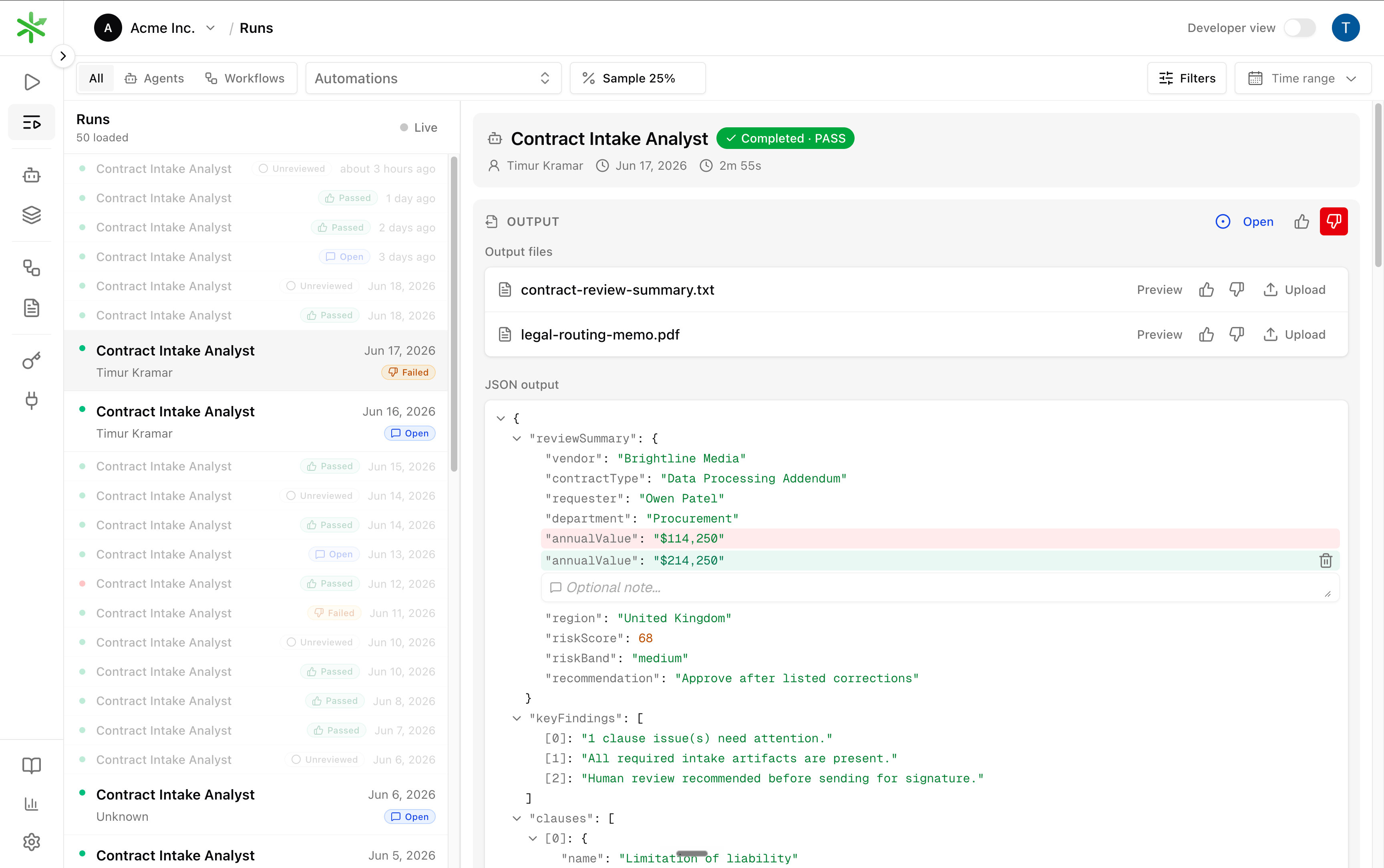
The Runs view: scope to an automation, set a sample rate, and review each run's output inline.
The dashboard and the API in the previous section operate on the same objects. The thumbs set the
review
verdict, the status dropdown tracks whether follow-up work is open or closed, editing the
JSON or uploading a file sets the expected output, and promoting adds it to the dataset. Use
whichever fits your team.5. Close the loop
Reviewing without fixing issues only creates backlog. Every open review should lead to a workflow improvement that is verified against the dataset, the same dataset the corrected run just joined.1
Reproduce
Inspect the trace of the failing run to find which step produced the wrong
output.
eigenpal runs trace <run-id>.2
Fix
Adjust the prompt, schema, model, or step logic. Push a new workflow version.
3
Confirm
Re-run the experiment. The promoted example is now part of the dataset, so a
passing experiment means the specific miss cannot recur unnoticed.
4
Close
Mark the run’s review closed. It leaves the open queue.
Before you ship
1
The eval passes
An experiment clears your threshold and beats the previous version.
2
The API trigger is enabled
The automation accepts API and CLI runs.
3
Your integration handles the run lifecycle
It calls
POST /api/v1/runs and waits for or polls the result.4
A traffic pattern is chosen
Shadow, ramp, or cut over, with a feature flag you can roll back.
5
A review sample is running
Start at 10 to 15% of production runs, with a plan to lower it.
6
Misses are corrected, not just flagged
Reviewed failures are corrected and promoted into the dataset, then driven to closed through
workflow fixes.