> ## Documentation Index
> Fetch the complete documentation index at: https://docs.eigenpal.com/llms.txt
> Use this file to discover all available pages before exploring further.
# Deploy to production
> Take a workflow from a passing evaluation to full automation, ramping production traffic with sampled human review.
This guide covers what happens after a workflow passes evaluation: integrating
it into your application, safely introducing production traffic, and keeping
humans in the loop until you are confident enough to automate fully. The same
flow applies to [agents](/concepts/agents); both run through the unified
[automation](/concepts/automations) surface.
Throughout this guide, "automation" refers to a deployed
[workflow](/concepts/workflows) or [agent](/concepts/agents) running in
production. You author the two differently, but you integrate, run, and review
them the same way.
The goal is not a one-time launch. It is a continuous improvement loop that turns
production failures into [regression tests](/guides/eval-first-development), so
the workflow becomes more reliable over time instead of drifting.
## The lifecycle
Do not deploy a workflow you have not measured. Start from a passing
[experiment](/concepts/evals) against a representative dataset.
Enable the API trigger and call [`POST /api/v1/runs`](/api-reference/runs/start-a-run) from your
application. Nothing acts on the output yet.
Shadow first, then ramp a growing fraction of real requests, or cut straight to 100% if the eval
and a short shadow period hold up.
Sample 10 to 15% of production runs for human review. Lower the rate as confidence grows, down
to 5%, then to full automation.
Every reviewed miss becomes a corrected dataset example. Fix the workflow, confirm the example
passes, and the loop tightens.
There is no requirement to reach full automation. Some teams keep a permanent review step for
high-risk workflows; others automate 100% of traffic once the dataset is broad enough. Pick the
end state that matches your risk tolerance.
## Prerequisite: a workflow you trust
Production starts from a passing evaluation, not from a workflow that happened to
work on a few examples. If you have not built a dataset and evaluators yet, do
that first:
* [Eval-first development](/guides/eval-first-development) for the end-to-end
pattern.
* [Build a dataset](/guides/build-a-dataset) for collecting real inputs and
expected outputs.
* [Evaluate a workflow](/guides/evaluate-workflow) for running and comparing
experiments.
A workflow is ready to integrate when an experiment across the dataset clears
your pass threshold and you have compared the current version against the
previous one.
```bash theme={null}
eigenpal workflow experiment run --wait
eigenpal workflow experiment compare
```
## 1. Integrate behind your application
### Enable the API trigger
By default a workflow accepts runs from the dashboard. To accept calls from your
own code, the automation needs its **API trigger** enabled. Runs started from the
API or CLI require the API trigger to be enabled: when it is off,
[`POST /api/v1/runs`](/api-reference/runs/start-a-run) returns `403` with the error code
`api_trigger_disabled`.
Enable the API trigger in the workflow settings in the dashboard.
Trigger state is readable from the API ([Get automation
triggers](/api-reference/automations/get-automation-triggers)), but turning a trigger on or off is
a dashboard action today, not a public API mutation.
### Start a run
Target the automation by `workflows.` (or `agents.`). For short jobs,
ask the server to hold the request until the run finishes. For longer jobs,
start the run and either poll or configure [outbound webhooks](/guides/outbound-webhooks)
to receive signed status changes.
```ts TypeScript theme={null}
// Short job: wait inline (seconds, not minutes).
const result = await client.run('workflows.extract-statement', input, {
waitForCompletion: 60,
});
// Longer job: start and poll.
const { id } = await client.run('workflows.extract-statement', input);
let run;
do {
await new Promise((r) => setTimeout(r, 2000));
run = await client.runs.get(id);
} while (!run.finished);
```
```bash CLI theme={null}
eigenpal run workflows.extract-statement \
--input-file document=statement.pdf
```
```bash REST theme={null}
curl -X POST https://studio.eigenpal.com/api/v1/runs \
-H "Authorization: Bearer $EIGENPAL_API_KEY" \
-H "Content-Type: application/json" \
-d '{"target":"workflows.extract-statement","input":{...}}'
```
Every run is stored with its inputs, outputs, model versions, and
[trace](/concepts/artifacts), whether or not anything downstream consumes the
result. That record is what makes the next two stages possible.
Reference: [Start a run](/api-reference/runs/start-a-run) and
[List runs](/api-reference/runs/list-runs), or the
[runs SDK reference](/sdks/typescript/runs) for the typed client.
## 2. Route production traffic
EigenPal does not split or ramp traffic for you. Your application decides which
requests reach the automation and what happens to the output. There are three
common patterns, in increasing order of trust. Most teams start with shadow mode,
then gradually ramp traffic as confidence grows.
**Shadow.** Send real inputs to the workflow but ignore the output in your
product. Compare it against whatever process you run today (manual entry, an
existing system, a previous model). Because every run is stored, you can review
shadow output later with the same tools you use for live runs. Nothing is at risk
while you build confidence on production-shaped data.
**Ramp.** Route a growing fraction of real requests to the automation and act on
its output: 1%, then 5%, 25%, 100%. Keep the split behind a feature flag so you
can roll back instantly if reviews uncover a regression.
**Cut over.** If the eval is strong and a short shadow period looks clean, route
100% from the start. This is reasonable for low-risk workflows or where a human
reviews output before it is used anyway.
Whichever pattern you pick, keep a review sample running. At 100% automation, sampled review is
your only signal that the workflow still matches reality.
## 3. Sample runs for review
Keep a sampled percentage of production runs for human review. Review turns
previously unseen production inputs into dataset examples instead of letting
failures become silent errors.
**Why review production runs?**
Evaluations tell you whether the workflow still passes the cases you already
know about. Human review uncovers failure modes that are not yet represented in
your dataset.
Run the review as a sampling rate you lower over time:
* **Start at 10 to 15%.** Enough volume to catch layout and edge-case misses
early, while the workflow is newest in production.
* **Lower to 5%** once a few review cycles pass without surprises.
* **Go to full automation** when the dataset covers the long tail and review
turns up nothing new. Keep a small ongoing sample if the input distribution
drifts (new customers, new document formats).
The mechanics: a reviewed run carries a review, which has a `verdict`
(`correct`, `incorrect`, or Nit) and a `status` (`open`, `closed`, or
`wont_fix`). A sampled run with no review is **unreviewed**. A real miss is
usually **Incorrect + Open**, and it moves to **Closed** once the underlying
issue is fixed and the example passes again. That open-to-closed transition is
what forces continuous improvement: a failing run stays on the board until the
workflow handles it.
For the full mental model, see [Reviews](/concepts/reviews) — especially
[Sampling](/concepts/reviews#sampling) and the
[Rolling window](/concepts/reviews#rolling-window) on Monitoring. For the
dashboard walkthrough, see [Review production runs](/guides/review-runs).
## 4. Review runs
You can review runs from the API (good for routing review into your own tools or
an internal queue) or from the dashboard.
### Via the API
**Find runs that still need review.** Use the run list to pull completed runs for
your automation, then inspect the `review` summary on each row:
```bash theme={null}
GET /api/v1/runs?type=workflow&source=workflows.extract-statement\
&status=completed&limit=100
```
Reference: [List runs](/api-reference/runs/list-runs) for the full set of query
parameters.
**Record a correct result.** When the output is correct, mark it closed so it leaves the
queue.
```bash REST theme={null}
curl -X PUT https://studio.eigenpal.com/api/v1/runs/$RUN_ID/reviews \
-H "Authorization: Bearer $EIGENPAL_API_KEY" \
-H "Content-Type: application/json" \
-d '{"verdict":"correct","status":"closed"}'
```
```bash CLI theme={null}
eigenpal runs reviews update $RUN_ID --verdict correct --status closed
```
Reference: [Update run review](/api-reference/reviews/update-run-review).
**Record an incorrect result and correct it.** When the output is wrong, set the
verdict to `incorrect`, leave the status `open`, and attach the corrected
output. `correctedOutput` is the corrected JSON; for corrected files, post them
to the expected-artifacts endpoint.
```bash REST theme={null}
# Corrected structured output.
curl -X PUT https://studio.eigenpal.com/api/v1/runs/$RUN_ID/reviews \
-H "Authorization: Bearer $EIGENPAL_API_KEY" \
-H "Content-Type: application/json" \
-d '{"verdict":"incorrect","status":"open","note":"Dropped one transaction","correctedOutput":{...}}'
# Corrected file (multipart). Or copy an existing run output file as expected.
curl -X POST https://studio.eigenpal.com/api/v1/runs/$RUN_ID/reviews/expected \
-H "Authorization: Bearer $EIGENPAL_API_KEY" \
-F 'file=@corrected.csv'
```
```bash CLI theme={null}
eigenpal runs reviews update $RUN_ID \
--verdict incorrect --status open \
--note "Dropped one transaction" \
--corrected-json-file corrected-output.json
eigenpal runs reviews expected upload $RUN_ID corrected.csv
```
Reference: [Update run review](/api-reference/reviews/update-run-review) for the
JSON verdict and corrected output, and
[Add corrected file](/api-reference/reviews/add-corrected-file) for corrected files.
**Promote the corrected run into the dataset.** This is the step that turns a
miss into a permanent test. Promotion copies the run's input, output, and the
corrected output and files from the review into a dataset example on the same
automation.
```bash REST theme={null}
curl -X POST https://studio.eigenpal.com/api/v1/runs/$RUN_ID/promote \
-H "Authorization: Bearer $EIGENPAL_API_KEY" \
-H "Content-Type: application/json" \
-d '{"name":"statement-layout-edge"}'
```
```bash CLI theme={null}
eigenpal runs promote $RUN_ID --name statement-layout-edge
```
Reference: [Promote run to example](/api-reference/reviews/promote-run-to-example).
Attach the corrected output **before** you promote. Promotion copies whatever expected output and
files are on the run's review at that moment; promoting before correcting produces an example with
no ground truth.
### In the dashboard
The **Runs** view provides the same review workflow as a queue, without building
your own review tooling. Scope it to one automation, turn on **Sample** at a
review rate (for example, 15%), and the list flags a sampled fraction of runs for
review. Each run carries a review badge such as **Unreviewed**, **Correct**,
**Incorrect**, or **Nit**, and the review panel tracks whether the issue is
**Open**, **Closed**, or **Won't fix**.
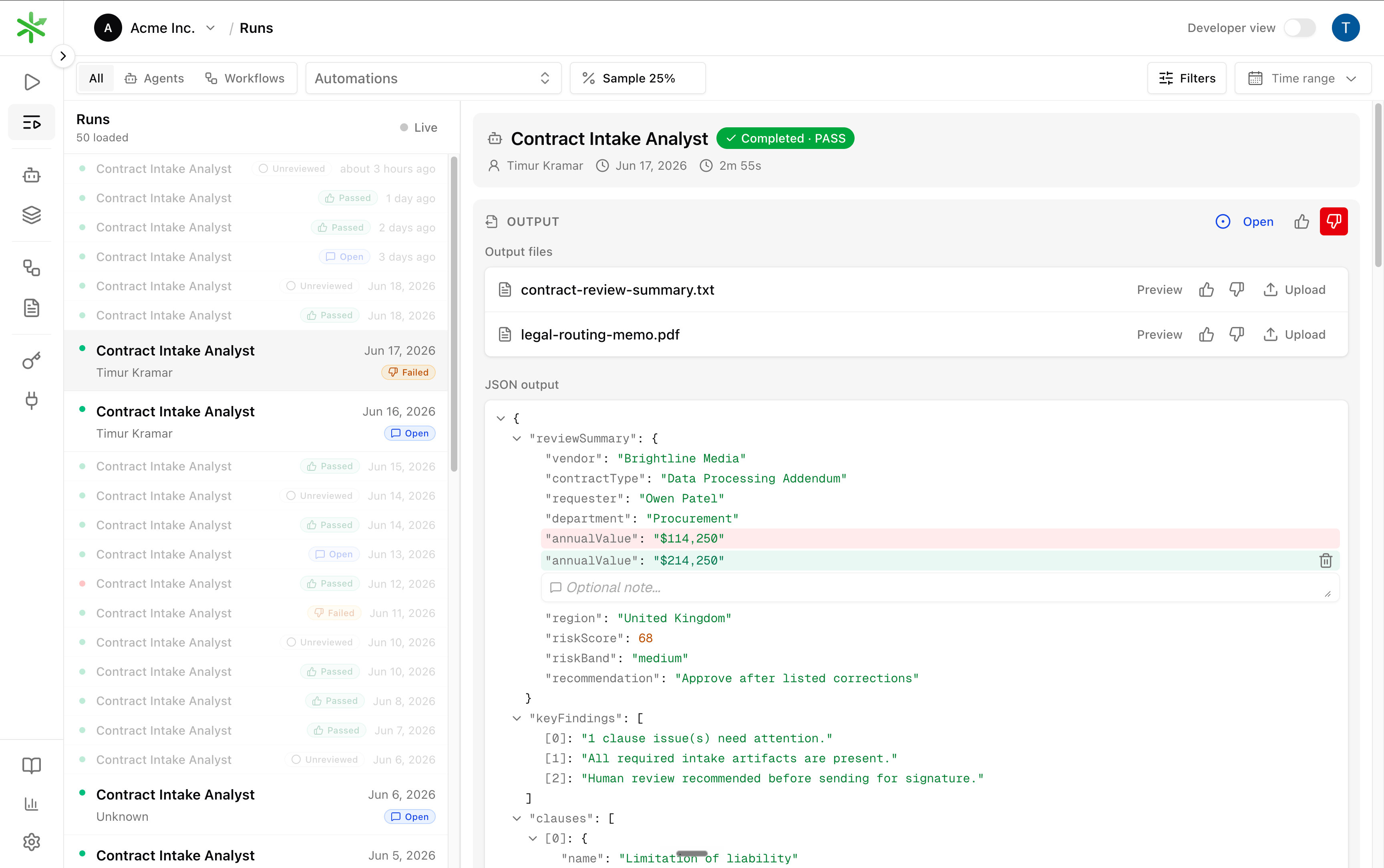 Select a run to review its output. Mark it **Correct** (thumbs up) or
**Incorrect** (thumbs down), or leave a **Nit** note when the feedback should
not affect accuracy. On an incorrect run, correct the output in place: edit a
field in the JSON output, add an optional note, and use **Upload** on an output
file to attach a corrected file. Saving the correction sets the run's expected
output, which is what a dataset example needs.
Promote the corrected run to add it to the automation's dataset. From then on the
miss is a regression test: change the workflow, and the example must pass before
the run leaves the **Open** state.
The dashboard and the API in the previous section operate on the same objects. The thumbs set the
review `verdict`, the status dropdown tracks whether follow-up work is open or closed, editing the
JSON or uploading a file sets the expected output, and promoting adds it to the dataset. Use
whichever fits your team.
## 5. Close the loop
Reviewing without fixing issues only creates backlog. Every open review should
lead to a workflow improvement that is verified against the dataset, the same
dataset the corrected run just joined.
Inspect the trace of the failing run to find which step produced the wrong
output. `eigenpal runs trace `.
Adjust the prompt, schema, model, or step logic. Push a new workflow version.
Re-run the experiment. The promoted example is now part of the dataset, so a
passing experiment means the specific miss cannot recur unnoticed.
Mark the run's review closed. It leaves the open queue.
```bash theme={null}
eigenpal runs trace
# fix workflow.yaml, then:
eigenpal workflow push
eigenpal workflow experiment run --wait
eigenpal runs reviews close
```
This is the same improvement loop described in
[How it works](/concepts/how-it-works) and
[Eval-first development](/guides/eval-first-development), now driven by sampled
production traffic instead of a fixed test set. Every cycle the dataset gets
closer to the real input distribution, the review rate can drop, and you can
automate a larger share of production traffic.
## Before you ship
An experiment clears your threshold and beats the previous version.
The automation accepts API and CLI runs.
It calls `POST /api/v1/runs` and waits for or polls the result.
Shadow, ramp, or cut over, with a feature flag you can roll back.
Start at 10 to 15% of production runs, with a plan to lower it.
Reviewed failures are corrected and promoted into the dataset, then driven to closed through
workflow fixes.
Select a run to review its output. Mark it **Correct** (thumbs up) or
**Incorrect** (thumbs down), or leave a **Nit** note when the feedback should
not affect accuracy. On an incorrect run, correct the output in place: edit a
field in the JSON output, add an optional note, and use **Upload** on an output
file to attach a corrected file. Saving the correction sets the run's expected
output, which is what a dataset example needs.
Promote the corrected run to add it to the automation's dataset. From then on the
miss is a regression test: change the workflow, and the example must pass before
the run leaves the **Open** state.
The dashboard and the API in the previous section operate on the same objects. The thumbs set the
review `verdict`, the status dropdown tracks whether follow-up work is open or closed, editing the
JSON or uploading a file sets the expected output, and promoting adds it to the dataset. Use
whichever fits your team.
## 5. Close the loop
Reviewing without fixing issues only creates backlog. Every open review should
lead to a workflow improvement that is verified against the dataset, the same
dataset the corrected run just joined.
Inspect the trace of the failing run to find which step produced the wrong
output. `eigenpal runs trace `.
Adjust the prompt, schema, model, or step logic. Push a new workflow version.
Re-run the experiment. The promoted example is now part of the dataset, so a
passing experiment means the specific miss cannot recur unnoticed.
Mark the run's review closed. It leaves the open queue.
```bash theme={null}
eigenpal runs trace
# fix workflow.yaml, then:
eigenpal workflow push
eigenpal workflow experiment run --wait
eigenpal runs reviews close
```
This is the same improvement loop described in
[How it works](/concepts/how-it-works) and
[Eval-first development](/guides/eval-first-development), now driven by sampled
production traffic instead of a fixed test set. Every cycle the dataset gets
closer to the real input distribution, the review rate can drop, and you can
automate a larger share of production traffic.
## Before you ship
An experiment clears your threshold and beats the previous version.
The automation accepts API and CLI runs.
It calls `POST /api/v1/runs` and waits for or polls the result.
Shadow, ramp, or cut over, with a feature flag you can roll back.
Start at 10 to 15% of production runs, with a plan to lower it.
Reviewed failures are corrected and promoted into the dataset, then driven to closed through
workflow fixes.